LOOM / 06
Agents & Interfaces
Browse all chaptersLOOM is the environment an agent can work with. It is not the model, the conversation, or the personality speaking to you.
The boundaries are part of the design
An agent session combines several systems. Keeping their responsibilities explicit makes failures easier to diagnose and the whole arrangement easier to replace. You should be able to change an agent harness without moving the project's files or losing its decision history.
- LOOM
- Shared system operations and durable context
Projects, capabilities, jobs, storage, discovery, Notes and Provenance. Typed operations expose state and results.
- Hermes
- Agent harness
Conversation execution, terminal and messaging sessions, harness memory, native skills and its own automation runtime.
- MINA
- An optional agent identity
Personality, operating protocols and workspace context used by a configured Hermes profile. Not a second name for LOOM.
- ORCA
- Development workspace and interaction environment
Project contexts, terminals, worktrees and supported shared-browser access. It does not become LOOM's system coordinator.
- Codex
- A coding-agent environment
Code-oriented sessions and tools that can consume project instructions and call supported LOOM interfaces.
MINA is one configuration, not a requirement for using the backend. People can operate LOOM directly; other compatible agents can use its interfaces. Git remains Git, and a worktree remains a development tool rather than a new LOOM node.
Different entrances, the same system
The CLI provides inspectable commands and structured output for both humans and agents. The terminal Portal offers an interactive view over supported operations. The API and local client provide typed programmatic access. These are interfaces to LOOM, not replacements for a model's own tools.
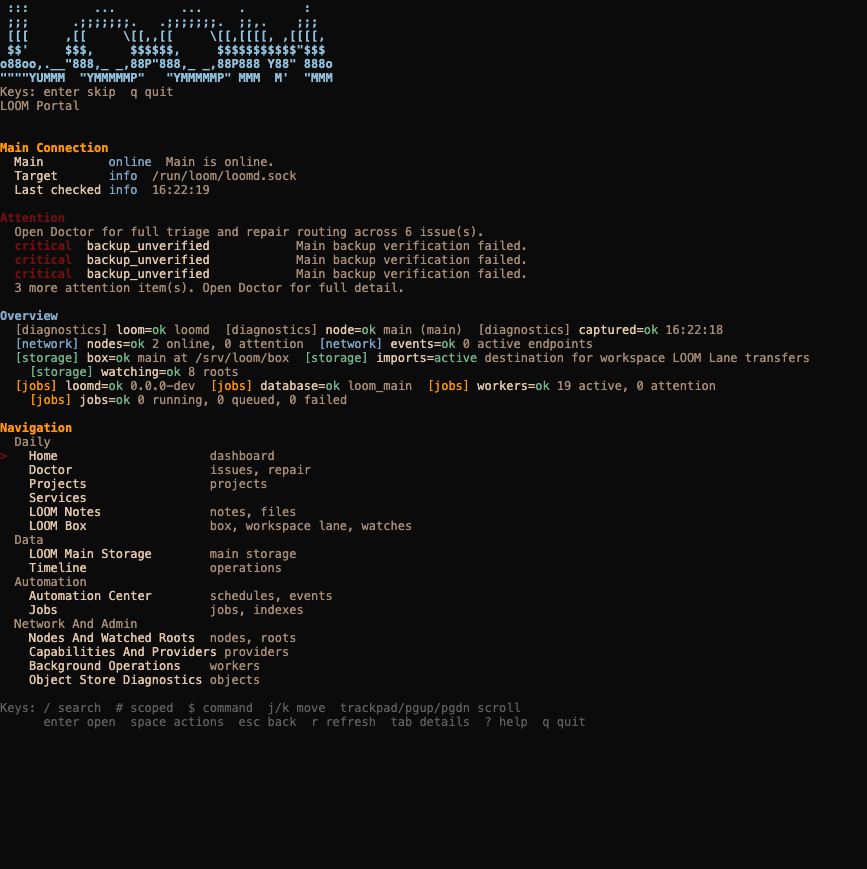
Recording details and text transcript
The real command, boot animation and complete home screen were captured at 120 columns by 62 rows. Playback runs at 2x speed. The opening idle pause was shortened; Portal output was not rewritten. This player has no connection to Main and accepts no shell input.
Read the captured screensA shell command that edits a source file is ordinary development. A request to deploy a service, reconcile a candidate or change managed storage crosses into a LOOM-owned operation. The relevant interface carries its inputs, authorization and result, so the action can be understood independently of the chat that requested it.
Interface parity is still evolving. The CLI-led project workflow is ahead of some older Portal forms. The public preview does not claim that every operation is equally convenient from every entrance.
Instructions travel with the work
A project's AGENTS.md is an entry point, while .project/ explains the work itself. Installed LOOM skills teach an agent when and how to use system surfaces. Native harness skills can add other abilities, and identity-specific protocols explain an agent's role.
These are instruction packages, not executable capabilities or credentials. Installing a Basecamp or Provenance skill does not authenticate an account, grant permission, or cause a scheduled task to run. Those connections must exist independently.
- Ask
A person asks why research-sync chose a particular storage approach.
- Route
The harness reads relevant context and selects Provenance for the decision, rather than guessing from conversation memory.
- Inspect
The agent follows the compact match to its exact record and, when needed, the source passage in Notes.
- Respond or register
It explains the evidence, or submits a new source-qualified candidate when the user makes a new decision. Submission is not automatic acceptance.
A portable agent workspace can be versioned and reviewed. Its instructions are not a reason to commit authentication material, private session history or runtime databases alongside them.
A browser is not a desktop, and a session is not a memory store
The configured Main-side browser is suited to unattended web work on Main. ORCA's shared browser is a separate interaction surface. Mac computer use reaches the Mac's desktop through a configured bridge and the Mac's permissioned driver. Normal SSH is another channel again: shell access does not automatically provide desktop control.
The reviewed integration has exercised Mac computer use through Hermes terminal and messaging paths. That does not imply every browser interaction or desktop application is flawless, nor that an offline or unpermitted Mac can be controlled. General-purpose agent SSH access to the Mac remains a separate acceptance item.
Hermes terminal and gateway sessions can use one configured profile while retaining distinct conversations. Shared profile storage can support authorized retrieval of earlier context; it is not a promise that every terminal attaches to the gateway's active conversation or that messages are automatically disclosed across channels.