PROJECTS

Back to Projects

A small peek into an ongoing workspace project for coordinating projects, knowledge, storage, services, and machines for people and AI agents.

00 / A small window

A SMALL PEEK INTO LOOM

This page is a small public peek into LOOM, an ongoing project I am building around a much larger idea for a shared workspace.

LOOM is intended to coordinate projects, knowledge, storage, services, and machines for both people and AI agents. The CLI shown here is the clearest working slice today, not the boundary of the project and not a claim that the wider system is finished. Much of that wider system remains under active development.

At the center of the current build is a Linux main node running LOOM services and coordinating work across a private network, while workspace machines remain the places where people and agents interact with the system.

01 / The gamble

THE LOCAL-AGENT BET

I am building LOOM around a gamble: as AI agents improve, more useful work can happen locally and across machines I control.

The difficult part is not merely giving an agent shell access. It is creating a workspace it can understand: stable project conventions, searchable knowledge, storage movement, backup policy, jobs, and clear authority across machines. LOOM explores how those parts can feel like one environment without hiding their boundaries.

02 / The first interface

THE CLI COMES FIRST

The terminal Portal is the first interface mature enough to show, not the final shape of LOOM.

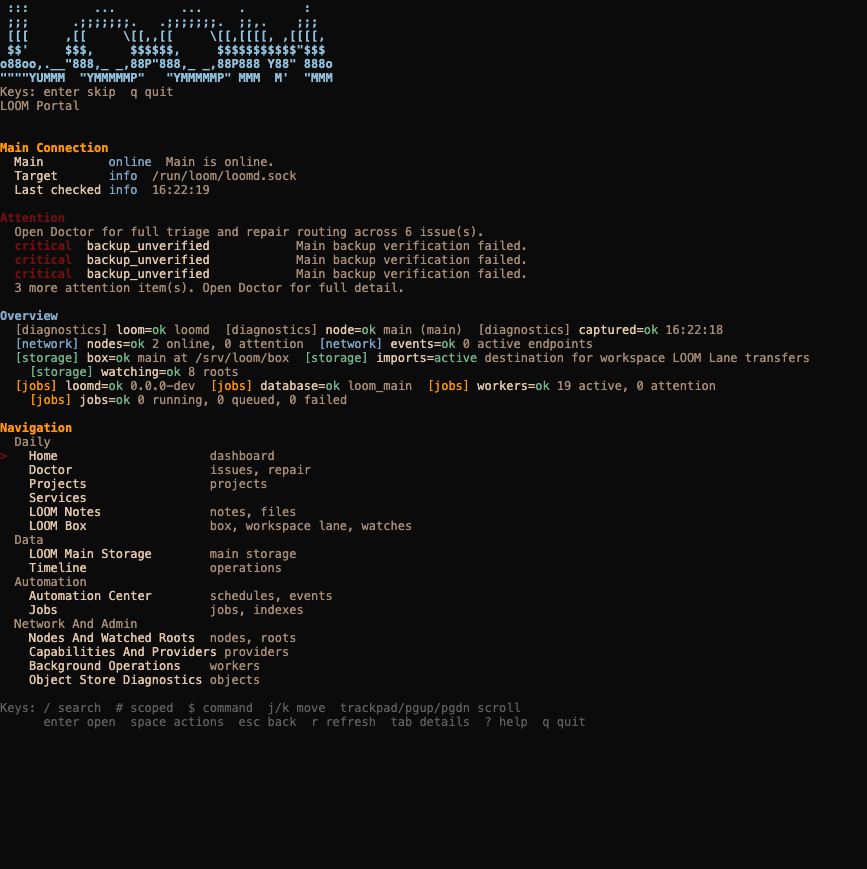
Running loom enter opens the terminal-native Portal: a navigable view of the workspace, its available surfaces, and operational state. The browser terminal below offers a small glimpse of that interaction using deliberately fictional values. It has no shell, backend, or connection to LOOM.

A deterministic browser replay. No shell, network connection, or real LOOM data is present.
Synthetic terminal prompt: loom enter __ | \ | $$ ______ ______ ______ ____ | $$ / \ / \ | \ \ | $$| $$$$$$\| $$$$$$\| $$$$$$\$$$$\ | $$| $$ | $$| $$ | $$| $$ | $$ | $$ | $$| $$__/ $$| $$__/ $$| $$ | $$ | $$ | $$ \$$ $$ \$$ $$| $$ | $$ | $$ \$$ \$$$$$$ \$$$$$$ \$$ \$$ \$$ LOOM Portal Overview No failures. [diagnostics] loom=ok loomd [diagnostics] node=ok main (main) [diagnostics] captured=ok 09:41:18 [network] nodes=ok 3 online, 0 attention [network] events=ok 4 active endpoints [storage] box=ok workspace at ~/loom-box [storage] lane=pending 2 pending, 48.0 MB [storage] dropzone=ready 0 active, 0 failed [storage] watching=ok 2 roots [jobs] loomd=ok version unknown [jobs] database=ok database [jobs] workers=ok 4 active, 0 attention [jobs] jobs=running 1 running, 2 queued, 0 failed Recent Activity pending LOOM Lane pending 100% 2 pending items running Jobs running 1 running jobs Navigation Daily > Home dashboard Doctor issues, repair Projects projects LOOM Notes notes, files LOOM Box box, lane, watches Data LOOM Main Storage main storage Timeline operations Automation Automation Center schedules, events Jobs jobs, indexes Network And Admin Nodes And Watched Roots nodes, roots Capabilities And Providers providers Background Operations workers Object Store Diagnostics objects Keys: / search # scoped $ command j/k move trackpad/pgup/pgdn scroll enter open space actions esc back r refresh tab details ? help q quit

03 / Humans and agents

SAME WORKSPACE, DIFFERENT AUTHORITY

LOOM treats people and agents as actors using the same workspace rather than building an isolated agent-only control plane.

Both can encounter the same projects, notes, storage, and operational surfaces, but they do not receive identical authority. Permissions can be scoped, actions can be logged, and access can be revoked.

That principle is further along than any autonomous LOOM-owned agent. Current work focuses on making the workspace legible and safe for existing local agents; richer orchestration remains a later part of the project.

04 / System shape

THE SYSTEM UNDERNEATH

LOOM is taking shape as a Go system deployed with Nix across workspace machines, a Linux main node, and a private WireGuard network.

This is not a finished infrastructure diagram. It is the larger operational shape behind the small CLI preview: local workspaces, a coordinating main node, private networking, and cloud-backed retention working as parts of one system.

01Go / Nix
LOOM's CLI and services are written in Go. Nix and NixOS make packages, services, and machine configuration reproducible across nodes.
02Workspace nodes
Machines such as this Mac remain interactive workspaces: people and agents create projects and use the Portal locally while requesting work from the nodes that own it.
03Linux main node
A Linux main node runs long-lived LOOM processes, coordinates projects and jobs, maintains indexes, and drives backup policy without making every workspace depend on a remote desktop.
04WireGuard / VPS
Nodes communicate over a private WireGuard network. A small, replaceable VPS provides the stable public endpoint; it is not the main node and holds no canonical LOOM state.
05Cloud / backup
Cloud storage provides an off-site destination for backups and deliberate archives. It extends the local storage strategy rather than replacing node-owned live data.

05 / Features today

A WORKING CORE

Behind the architecture is a substantial set of working features, even though their interfaces and boundaries continue to evolve.

These are the main surfaces available through the CLI and Portal today. They are parts of the same workspace rather than isolated tools, and each is still being tested and refined.

01Projects / contracts
Create projects on a chosen node, add distinct working facets, archive them, and validate the contracts that describe how each workspace should behave.
02Storage / movement
Move material through the Box and Lane, inspect main storage, and make transfer, retention, and cleanup behavior visible instead of relying on ad hoc paths.
03Notes / search
Register note roots across the network, index their contents, search them from the CLI or Portal, and project them into one read-only knowledge view.
04Backups / recovery
Define coverage for LOOM and selected external paths, run local or cloud backup work, and inspect whether retained data is actually recoverable.
05Nodes / network
Inspect registered machines, watched roots, providers, and the typed scripts, workflows, or connectors those providers expose to the network as capabilities.
06Jobs / automation
Queue repeatable work, follow runners and workers, inspect failures, and manage scheduled or event-driven automation from the same operational surface.

06 / What comes next

THE PREVIEW WILL GROW

LOOM is still unfinished, and the CLI is only the first piece I can show coherently.

Near-term work includes cleaner project-local LOOM metadata, smarter transfer and ignore rules, intuitive folder-watch contracts, a small hardware health dashboard, and reusable LOOM skills for agents.

Beyond that, I want modular workspace interfaces for control, notes, messaging, and direct agent interaction. Those interfaces should grow from the same tested core rather than become separate products.

ONE WORKSPACE / MANY SURFACES / EXPLICIT AUTHORITY